Prepare screenshot sizes for two app stores
Admin ·
Apple accepts specific screenshot dimensions for each display class. Google Play describes size ranges and aspect ratios for its listing types. Choose targets for the devices and layouts that your app actually uses.
Generate two portrait files from the same example
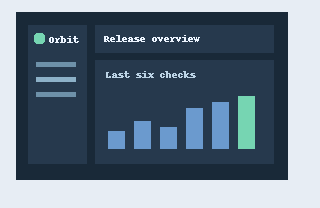
Select Load example to open the 320 × 208 source. Keep Apple iPhone Dynamic Island medium selected and add Google Play phone. Use Portrait, Contain with padding and 24-bit PNG. Generate the two files.
| Target | Saved portrait size | How to read it |
|---|---|---|
| Apple iPhone Dynamic Island medium | 1206 × 2622 | One accepted size in this Apple display class |
| Google Play phone | 1080 × 1920 | A 9:16 example inside Google's phone range |
ToolMellow publishing screenshot exampleApple App Store Connect screenshot specificationsGoogle Play Console screenshot requirements
Compare crop and padding before choosing
Contain scales the whole screenshot into the canvas and fills the remaining space with the selected background. The wide example leaves space above and below in portrait files.
Switch to Cover with centered crop and generate again. The center fills the canvas, and the left and right edges of this wide source are cut. Use a source close to the target aspect ratio when the full interface must stay visible.
ToolMellow publishing screenshot exampleApple App Store Connect screenshot specificationsGoogle Play Console screenshot requirements
Check the exported ZIP against the listing
Download the ZIP and open both files to verify their actual dimensions. The PNG stores three color channels without alpha. JPEG also uses the chosen opaque background. Google Play targets above 8 MB are reported with a size error.
The preset sizes were checked against the published specifications on 20 November 2026. Your listing can require additional device classes, screenshot counts or content checks.
Apple App Store Connect screenshot specificationsGoogle Play Console screenshot requirementsW3C Portable Network Graphics Third Edition
Common questions
Does landscape rotate the screenshot?
It swaps the width and height of the target canvas. The source stays in its decoded orientation.
Can the resizer certify that the listing will be accepted?
It prepares candidates with selected dimensions and opacity. Review the current device, count and content requirements in your listing.