Compare oil color blocks and watercolor washes
Admin ·
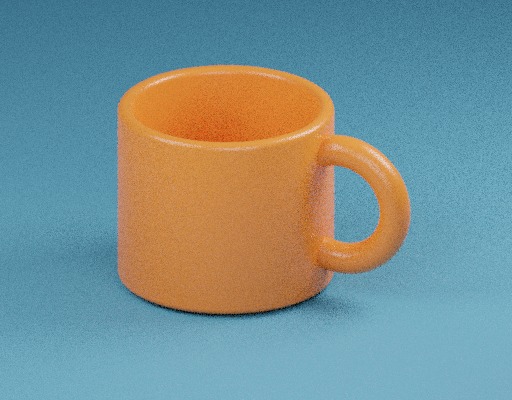
A painterly treatment groups neighboring colors into broader regions. Practise on the mug example so you can compare a curved boundary with the broad surface inside it.
Follow the color blocks across the mug
Select Load example. Apply Oil painting with Brush size 6 px and Intensity 100%. Compare the broad shades on the mug body and the boundary of its handle in the 512 × 400 output.
The filter samples four overlapping square neighborhoods that meet at each pixel. It favors the color mean of the neighborhood with the lowest combined RGB variance and averages tied means. Alpha weights give fully clear neighbors zero influence.
ToolMellow example mug photoKyprianidis, Kang and Döllner, related work on classical Kuwahara filtering
Compare smaller and larger brush radii
Apply the same image at 2 px and then 12 px. A larger radius lets nearby colors influence a wider area. Check both the smooth surfaces and the silhouette before choosing a scale.
| Setting to try | What to compare |
|---|---|
| Oil painting, 2 px, 100% | Look for fine detail remaining on the mug surface. |
| Oil painting, 12 px, 100% | Compare large color patches near the same surface. |
| Watercolor wash, 12 px, 100% | Compare lighter, less saturated color regions at the same size. |
| Watercolor wash, 12 px, 40% | Observe the soft wash blended with more of the original texture. |
Kyprianidis, Kang and Döllner, related work on classical Kuwahara filtering
Check the result on a transparent edge
Choose a transparent PNG, apply either style and compare Before and After on the checkerboard. Watercolor wash lifts and softens the RGB colors. The local download stores the same alpha mask and displayed pixel dimensions.
Use the saved PNG as a new image layer and keep the source photo for later edits. The output records RGB and alpha as 8-bit sRGB samples.
Common questions
How large is a brush neighborhood at radius 6?
Each candidate square spans up to 7 × 7 pixels. The four candidates overlap on the current row and column and are clipped at image boundaries.
Why do some details get lost at high settings?
Larger neighborhoods group small variations into broad color regions. Lower Brush size or Intensity to retain more of the original texture.