Replace Two Sensitive Pixel Regions in a Work Order Image
Admin ·
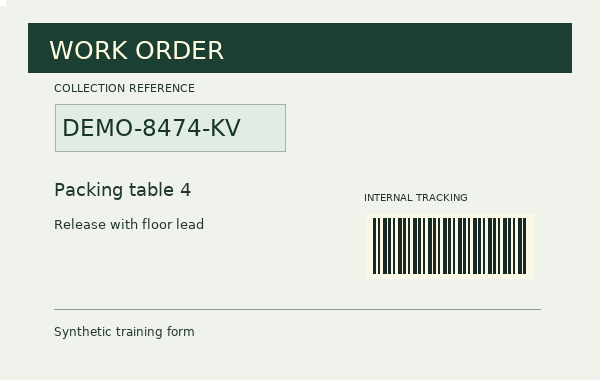
Practice on a synthetic work order. Put one rectangle over the collection reference and one over the tracking bars, then open the exported PNG to inspect the physical result.
Place a black fill over the collection reference
Select Load work order example. The editor shows a 600 × 380 image. Select Add region and leave its fill black.
Set Width and Height first. Then set Left and Top. This gives the controls room to move the box to the intended coordinates.
| Region | Left and top | Width and height | Fill |
|---|---|---|---|
| Reference | 50, 100 | 240 × 60 px | Black |
| Tracking bars | 360, 210 | 180 × 72 px | White |
Synthetic 600 × 380 work orderWHATWG Canvas bitmap serialization
Review the second rectangle around the tracking bars
Draw or add the second rectangle and enter the tracking coordinates. Choose White fill. Use Region 1 and Region 2 to check that both blocks cover the full intended area.
The orange border and resize handle indicate the current selection in the editor. Select Prepare redacted image to inspect the saved-file preview without those controls.
Synthetic 600 × 380 work orderWHATWG Canvas bitmap serialization
Open the exported PNG and verify the fills
Download the PNG and open it at full size. The reference area is solid black, the tracking area is solid white, and the page title outside both rectangles is readable.
The sample source has a text metadata field named TrainingNote. The new PNG carries its rendered image and any information the encoder supplies. Use Image Metadata Viewer if you want to inspect the download’s actual fields.
W3C PNG metadata and transparency definitionsWHATWG Canvas bitmap serializationSynthetic 600 × 380 work order
Common questions
Which format should I choose to keep the rectangle edges sharp?
PNG uses lossless compression and preserves the pixel values written by the editor, including opaque fills and available transparency outside them.
What happens when two redaction regions overlap?
The later region’s color covers the shared area. Both regions replace the underlying image pixels before the file is written.