Split an uneven image grid without losing pixels
Admin ·
A grid can divide a collage into separate images for review. A source with odd dimensions leaves extra pixels along both axes. Use a numbered preview to see exactly which tiles receive them.
Preview six tiles on the practice image
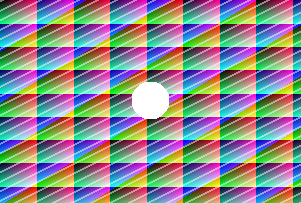
Open Image Grid Splitter and choose Load example. The sample is 301 × 203 pixels and the grid starts with two rows and three columns.
The preview counts the tiles from left to right across the first row, then continues across the second row. Choose Split image to see the exact tile dimensions and the separate downloads.
Check which tiles receive the extra pixels
The first column is 101 pixels wide and the other columns are 100 pixels wide. The first row is 102 pixels tall and the second is 101 pixels tall.
Tile 1 is 101 × 102 pixels. Tile 5, the center tile in the second row, is 100 × 101. Each source pixel appears in one tile, including the transparent circle that crosses the middle row boundary.
| Download name | Grid position | Pixel size |
|---|---|---|
| tile-r01-c01.png | Row 1, column 1 | 101 × 102 |
| tile-r01-c02.png | Row 1, column 2 | 100 × 102 |
| tile-r02-c02.png | Row 2, column 2 | 100 × 101 |
Download the original 301 × 203 practice gridW3C PNG specification, alpha channels
Download the tiles in row and column order
Download one tile to make a quick check. Choose Download all tiles as ZIP for the set. Sort the extracted files by filename to get the same order as the numbered preview.
Place the center tiles over a new color to see the transparent areas. If you reassemble the PNGs, align their pixel edges and use each tile at its actual dimensions.
Common questions
Can I get perfectly equal tile dimensions?
Choose a grid that divides the image width and height evenly, or resize the source to an exact multiple first.
Do the PNG tiles keep the orientation I saw?
Yes. Tile positions use the oriented image shown in the preview. Embedded color profiles are converted to sRGB in the output.